


Your AdWords account isn't delivering, but you don't have time to sit down and tackle the problem. Sound familiar? Follow this 5 step guide to optimize your AdWords account and improve PPC performance in just 5 minutes.
Step 1: Define Your PPC Objectives
Sounds obvious, but take time to define exactly what you need to achieve with your pay per click campaigns.
Do you have a respectable volume of conversions and an enviable conversion rate, but a lack of traffic? Do you need to bring your AdWords spend down significantly - without losing conversions? Do you have a disappointing conversion rate?
You should know this already, so it won't take long, but clarifying exactly what your business needs from your AdWords account will make your decision making easier.
Time taken: 30 seconds Total AdWords Optimization Time: 30 seconds
Step 2: Check Your AdWords Campaign Settings
Google is always testing and implementing new features to improve PPC performance. And while this has advantages for advertisers, it's all too easy to fall behind the latest updates.
If you haven't looked at your campaign settings since you set up your account, take the time to review them now. Look at these key areas:
- Location Targeting: Are your ads showing in the right locations? Make sure that your ads are only displaying in the areas that you serve to avoid spending on traffic that won't convert.
- Device Targeting: With the rise in the use of smartphones and the introduction of tablets like the iPad, it's more important than ever to target the right devices. Generally speaking people use tablets in a similar way to computers and laptops, so you're safe to target both in one campaign. Mobile users, however, are a whole different ball game. If you want mobile traffic, create a new campaign targeting mobiles only.
- Ad Scheduling: Make sure you're ads are showing at the right times. If your business is open 9-5, Monday - Friday do your ads really need to display at the weekend? You may even been missing out on conversions as no one is available to answer the phones.
- Ad Rotation and Bid Type: Want full control over your account? Set your ads to rotate evenly and your bid type to manual CPC bidding. With these settings in place, you can effectively test new ad copy, increase bids on top performing keywords only, and generally you are keeping the power over your account. If you don't have time to devote to PPC Optimisation, you may prefer to let Google optimise your ads and bidding. Be aware though that Google is out to make money, and the automatic system may make choices that are great for their bottom line, not yours.
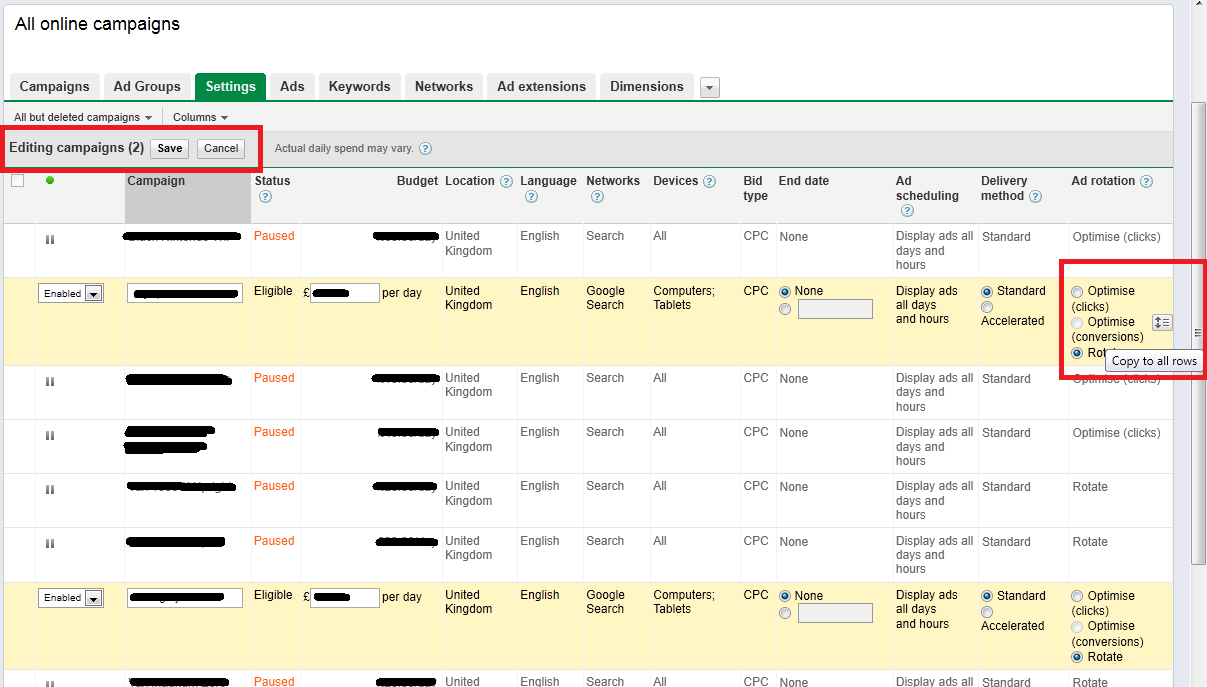
If you have multiple campaigns that all need the same settings, you can easily edit them all in seconds:
- Edit the settings on just one of your campaigns, then view Settings for All Online Campaigns.
- Select the campaigns you want to share settings, including the campaign you already edited.
- Hover over each setting and a little "Copy to all rows" icon will appear. Click this, hit save and voila all your campaigns will now share Settings.
Time taken: 1 minute 30 seconds. Total AdWords Optimization Time: 2 minutes.
Step 3: Use Filters to Weed Out Underperforming Keywords
One major drain on AdWords campaigns is underperforming keywords. You'll all have your own definition of what "underperforming" means - that you should have set out in Step 1.
It may be that you spend 50 and didn't see 1 conversion, you may have had 1,000 ad impressions and 2 clicks. Whatever it is, you're going to use Filters to chuck out the trash, fast.
View Keywords for All Online Campaigns (trust me, it won't be hard to handle). Then you're going to set up your Filter:
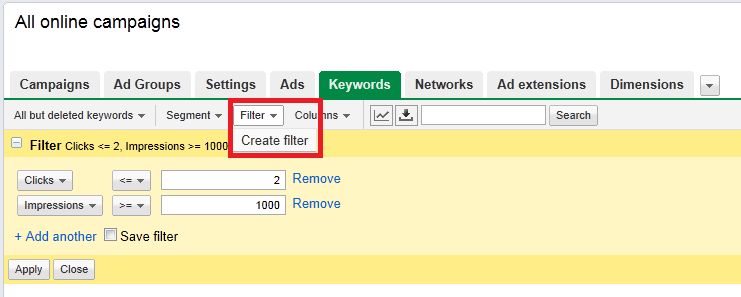
Enter in whatever details are relevant to you - if you care about clicks a Filter like the one above will weed out keywords that aren't sending traffic your way. Simply highlight all the Keywords in the Filter and pause them.
You may need to run a few different Filters to get rid of everything that isn't working for you.
Time taken: 45 seconds. Total AdWords Optimization Time: 2 minutes 45 seconds.
Step 4: Create Negative Keywords to Improve AdWords Performance
Hopefully you'll already be familiar with the concept of negative keywords, well now you're going to add more negative keywords to improve the quality of AdWords traffic in seconds.
Staying in the Keywords tab, close your Filters and select all keywords. Click "See search terms" and select All, like in the picture below, for a full list of every search query that's led to a click on your ad.
Scan through the list and highlight any nonsense or irrelevant search terms. You can then Add as negative keyword to ensure that your ad doesn't display for that search term again.
Time taken: 1 minute 15 seconds. Total AdWords Optimization Time: 4 minutes.
Step 5: Pause Poorly Performing Ads
Time is ticking and you've only got 1 minute left - so what on earth do you look at now? Check out the performance of your ads.
Use Filters to once again seek out the underachievers and pause them. Again you'll need to use your own judgement to decide what will class as a "failure" and that should relate directly to the PPC objectives that you set out in step 1.
Time taken: 1 minute. Total AdWords Optimization Time: 5 minutes.
So you've whipped your Google AdWords account into shape in just 5 minutes flat. But now the fun really starts.
You need to go back and start testing out new ad copy, new bids, new ad extensions to see what other improvements you can make to your PPC performance. The AdWords optimization process is never truly done, but with this 5 step plan, you'll be well on your way to getting great results from pay per click.
About the Author: Katie Saxon


