


Any SEO will tell you that the hard part of the job is not just working on your own efforts but also keeping an eye on what your competitors are up to. With that in mind, here is a way you can do routine competitor research for your SEO using only a Microsoft Excel spreadsheet!
What our solution does is goes to Google and returns the top results for a search query. Why is this important?
- This is useful if you want to know who your competitors are, and how much better than you they are doing in the search results.
- It's also good for monitoring your SEO success over time, and the success of other players in your playfield.
- Lastly, this can be useful to identify newcomers, so you are never caught by surprise when a new player enters your playfield.
How to use it
- Download the file competitor-research.xls and open it.
- Enter your website's URL in cell A2
- Enter the various search terms you compete in, in column B
- Press Ctrl-Shift-U
The script will scan all the Google result pages for the terms you specified, and will collect all the results that aren't your site.
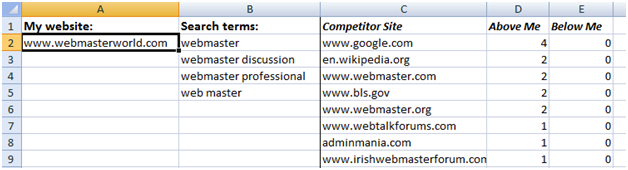
It will also count the total times each competitor site appears above your site, and below your site.
The result list is ordered by competitor strength, the stronger first.
How it works
The main routine, CompetitorResearch, starts by retrieving our website URL and the search terms, and goes on to process the terms one by one using the utility subroutine ProcessTerm.
'' Retrieve my url
Dim myurl As String
myurl = sheet.Cells(2, 1).Text

'' Work through the list of search terms and process each one
row = 2
While (sheet.Cells(row, 2).Text  "")
    Dim term As String
    term = sheet.Cells(row, 2).Text
    ProcessTerm term, myurl
    row = row + 1
Wend
After all the data is computed, it is also sorted by the "Above me" column and then by "Below me". This way, the site that appears above me in most search term results, is considered the strongest competitor.
The other important subroutine, ProcessTerm, scans search result pages for a specific term:
For page = 1 To PagesToScan
    url = BuildSERPURL(term, start)
    contents = FetchPage(url)
The result pages are searched for organic result links, identified by the string <h3 class="r"><a href="...">
If a result link is a link to my URL, then a flag is raised to indicate that any further links are below me, not above.
If InStr(url, myurl) > 0 Then
    '' This my URL. Everything from here on is below me
    foundMyUrl = True
For all other links, the host name is extracted from the URL. For the sake of this tool, the host name is what differentiates between sites. If this is not the case in your niche (for example if there are plenty of competitors using various subdomains), then you may want to change this code.
hostname = GetHostname(url)
Then the existing list of competitors is scanned to see if (and in which row) this host name already exists. This is done with the Match formula function, which might fail with an error if the host name does not already exist.
row = -1
'' Locate this competitor URL in the existing list
On Error Resume Next
row = Application.WorksheetFunction.Match(hostname, sheet.Columns(3), 0)
On Error GoTo 0
Then, if this competitor site does not already exist in the list, it is added into a new row.
In any case this appearance in the results is counted as either "Before me" or "After me" and the code moves on to the next result
'' Count this appearance either below or above me
If foundMyUrl Then
    sheet.Cells(row, 5).Value = sheet.Cells(row, 5).Value + 1
Else
    sheet.Cells(row, 4).Value = sheet.Cells(row, 4).Value + 1
End If
Configuring the Macro
There are two easily configurable parameters at the top of the script:
- GOOGLE_WEBSERVER is the host name for the web server you wish to query. As with our previous tool, this allows you to research your competitors in a region-specific Google data center and server, like www.google.co.uk for the UK.
- PagesToScan is the amount of default-sized result pages to scan. This may be useful if you don't currently rank on the first result page, or if you want to research your weaker competition.
Summary
Knowing who to beat and analyzing how they got there can be a great way to improve your own SEO performance. This spreadsheet is a free and simple way to keep a track of your competitors over time. Is this something you might use for your own SEO efforts?
P.S.
I've updated the file so it now works on Office versions 2000 and up.
More SEO Spreadsheets
About the Author: Yoav Ezer


