


Google has lots of useful tools to offer to the marketer - most of them are free and awesome - the two words you not so often find go in combination. This post looks at various ways to do keyword research with free Google tools - more often than not you won't need any other tools at all.

1. Just Use Google Search
Google Search has answers to all questions (I mean it). You can both research your keywords and find valuable content ideas by just searching Google. The only trick is to learn how to use it correctly.
Here are a few tips for you to research your keywords using Google:
Use wildcard operator. A wildcard (*) will tell Google to substitute it for one or more words that would normally appear in the phrase. Here are just a couple example of how the wildcard search in Google may turn useful:
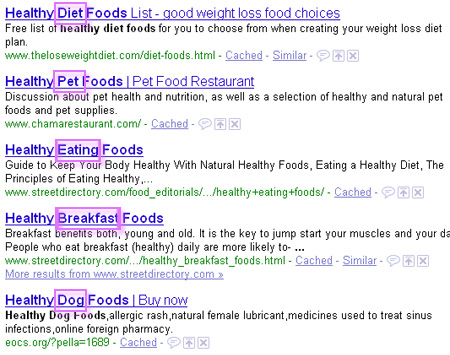
- Expand your base phrase by looking at what would Google normally insert into it. Example: ["healthy * foods"] search will include any phrases from "healthy snack foods", "healthy pet foods", "healthy holiday foods", etc
- Search for "link baiting" content ideas: try often-used Digg-style phrases in combination with wildcard and advanced date search:
Use synonym search: ~ operator will include some related terms in search results. The operator turns particularly useful when used before some most generic term (in a phrase or in combination with the wildcard operator). Example: [~money *] search will include pages about "currency converter", "currency encyclopedia", "financial aid process", "financial assistance", and many more:

Use (ALL)INTITLE: (ALL)INANCHOR: operators for competitor research. I mentioned this tip in my old post on competitive research: number of results for both [intitle:"keyword" and inanchor:"keyword"] – this is your exact competition, i.e. those who use SEO (optimized titles and incoming links anchor text).
2. Use Google's Keyword Tool
Most of us are aware of Google's public keyword research tools but not many know these tips:
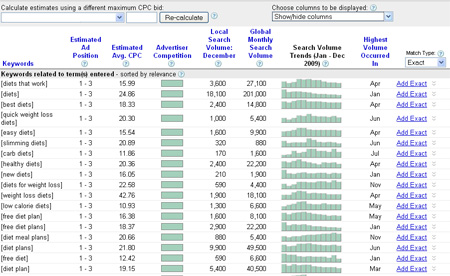
- Select the “Show/hide columns” drop down list, and choose “Show all”. This should be done to see trending and the average CPC (cost per click) is for top ranking on the paid results for these keywords.
- Under “Match Type” in the right-most column, select “Exact”. This will show a much more accurate count for the keywords you are researching, since it gives a monthly count for that exact keyword (as opposed to all phrases containing that keyword in addition to phrases Google considers related to that keyword).
- Treat the "Search Volume" column correctly: make sure to take the average user's behavior into account.
3. Check Google Insights
Google Insights tool is a must for checking trends. You can check this outstanding post by Googlers listing some great examples of this tool can be used. Here are just a few essential tips:
- Narrow data to specific categories, like finance, health, and sports (this will allow for more targeted results especially if one word have a few popular meanings);
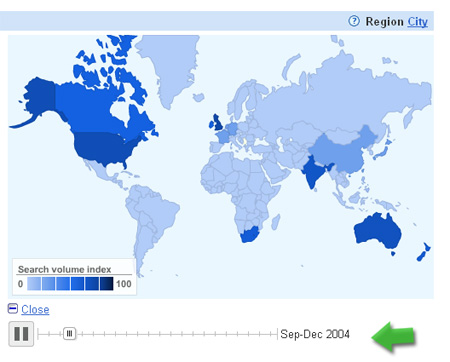
- Watch how trends were changing over time across regions and cities. (this one if pure fun!) The feature hides under "REGION" section behind the link "View change over time"
- Use Product search filter if you are doing research for some e-commerce project; Use News search for buzz research.
- Download data as CSV (the file contains much more data than it is displayed on the page).
4. Google's Wonder Wheel
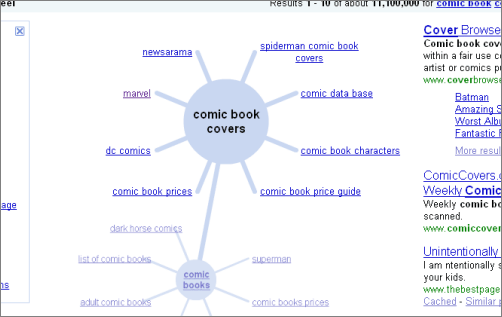
Wonder Wheel is Google's experiment that started last spring. That's a great tool to research various connections between the words and phrases. The feature hides behind "Show options" link shown in SERPs:
Clicking Wonder Wheel link will create an interactive chart which starts with your search term in the center, and related words and phrases around it. Once you click on any related term the wheel will expand to show this term related phrases:
5. Try Google Sets
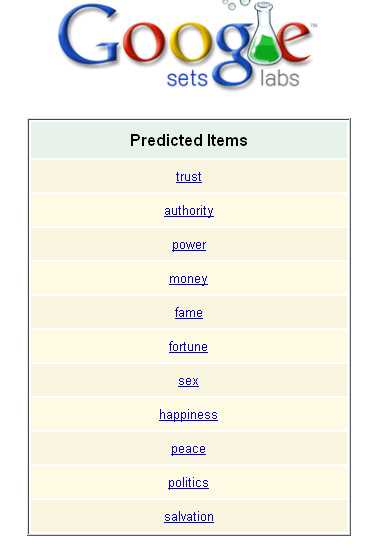
Google Sets tool is another fun way to research relations between the words. But if wonder wheel shows related words which are semantically close and/or have same base words, Google Sets tool shows words that tend to appear in the same context (same lists).
Google Sets tool analyzes the following when deciding of the two or more terms are related:
- Punctuation ( words separated by commas must be relevant, i.e. by forming a list);
- HTML tags (words within same (sets of) HTML tags – e.g. <li>, <h6>, etc – might be relevant).
The tool thus turns particularly useful for identifying neighboring terms:
Any more keyword research tips? Share them in the comments!
The guest post is by Ann Smarty, Director of Media for Search and Social. If you (like Ann) love guest blogging, join My Blog Guest, where bloggers meet to exchange posts and help promote each others' blogs.
Post image by TheAlieness GiselaGiardino²³
About the Author: Ann Smarty