Use Google Analytics Advanced Segments To Find The Real Questions Your Visitors Ask
To do keyword profiling to find out what your customers are really searching for, to get into their minds and understand what it is they specifically ask, you don’t have to go far.
Your own site has all the answers – and here’s how to find them.
The 5 W’s (+ 1 H & 1 C)
- Who
- What
- When
- Where
- Why
- How
- Can
These six words are at the heart of every conceivable question one can ask. They are the words used by searchers who want specific information; who want to see their questions answered.
You can easily find all the specific questions that led people to your site on a site-wide or page-specific level. Simply use an advanced segment that groups everyone who used one of these question words together.
Add Your Advanced Segment
You can do this manually or you can click here to add this advanced segment to your Google Analytics account.
To do it manually, click on Advanced Segments in your Google Analytics sidebar

Then click Create New Custom Segment

From the Dimensions, select Traffic Sources and drag Keywords to the drop zone.
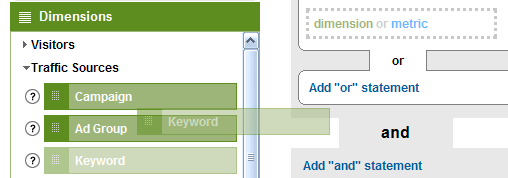
Add one of the question words, then click Add “or” statement to continue adding more questions words.
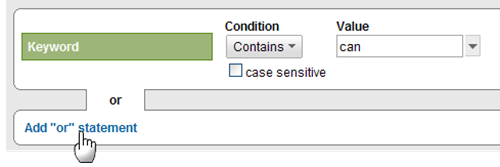
Continue until your advanced segments conditions look like this:
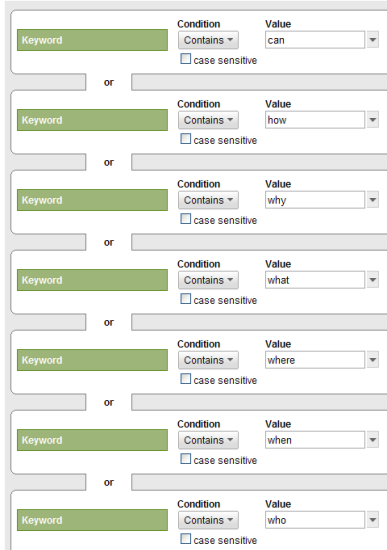
Name your advanced segment (“questions” comes to mind) and save it.
Again, you can also click here to add this advanced segment to your Google Analytics account.
You can make the filter visible in as many of your profiles as you wish. Also, you can import filters from one profile to another.
Extracting The Questions
Go to the site profile you want to analyze. Let’s start at the Keywords report.
Top-right click on Advanced Segments All Visits to change it.
Select your questions segment and uncheck all visits on the right so you only see the people asking questions.

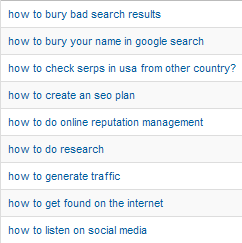
Here are some of the very specific questions people used to find our blog – what did they use to find your site?
Of course you can do the same on the page level.
Start with any of your content reports, again making sure your questions advanced segment is switched on.
Find a page and click on it. In my case I’m looking at the details page for 20 Things You Don't Know About Google.
Click on Entrance Keywords on the right.

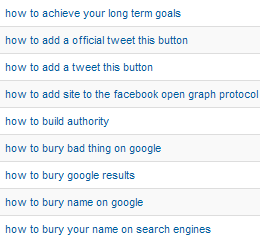
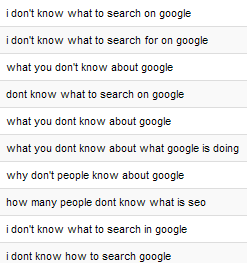
Here are some of the very specific questions that led people to that page:
How To Use This Information
- Find the frequently asked questions and create a frequently asked questions part
- Pick a questions and answer it in a blog post
- Look at which questions led people to a specific page. Often you’ll see the words in the questions happen to be on the page but the page itself isn’t really about the question asked. Consider writing a better page, a better post, answering that specific question.
- Look at that same info again: what can you learn about how Google apparently matched the query with your page? Ever had the same experience? How can you use that to improve your site?
- Spot your own problems: what are people trying to solve about your product or service? Can you improve there?
- Spot other’s problems: what are people trying to deal with regarding other people’s products or services? What can you do to turn that into business for you?
- What’s obvious to you but seems to be puzzling to others?
How are you going to use this information?
My paid passion job at Search Engine People sees me applying my passions and knowledge to a wide array of problems, ones I usually experience as challenges.
People who know me know I love coffee.


Excellent post Ruud!
BTW – that "share" link to automatically create the segment is awesome, but it only works if you have one (1) account/profile tied to your login, otherwise it picks the first one in your list and tries to add it there. Google should fix that.
and another BTW – the Anti-Captcha plugin kills bot spam without requiring an annoying CAPTCHA.
.-= Dan Thies recently posted: SEO Braintrust Coaching Explained =-.
Thanks Dan, you've made my day with that compliment! Almost as good as coffee
Re. the profiles: yeah, very annoying. Google is (purposely) an amateur when it comes to multi-accounts…
Andduh… that anti-captcha plugin sounds really good. Added it to my "unplanned but urgent" to-do list. Thanks Dan!
Loved this! I followed your steps and created some new reports. I hadn't been using advanced segments. It will take a little time for me to get the total hang of it but you got me started. Thanks!
They're really fun — and quite useful of course. Sometimes you can't use an advanced segment with an on-the-fly filter but oh well; can learn to live with that.
Advanced Segments (can) save time and are certainly useful for keeping an eye on a segment of visitors you often want to look at.
[...] Use Google Analytics Advanced Segments To Find The Real Questions Your Visitors Ask, Search Engine People [...]
[...] Use Google Analytics Advanced Segments To Find The Real Questions Your Visitors Ask, Search Engine People [...]
What a great idea – I just set this up and tried it out for my blog. It's awesome to get this view of the questions people are asking. It gave me a ton of new ideas for future blog posts. Thanks Ruud!
.-= Don Campbell recently posted: Back Up Your WordPress Website or Blog- What Are You Missing =-.
Great post Ruud, very interesting.
I suggest if you have a lot of searches that lead to visits on your site for words containing things like "can" – for example "Canon" "Canned" and so on you change the setup as follows:
Or statement:
Keyword matches -> Regular expression -> \bcan[\s.,"]
Leave case sensitive unchecked.
You could do the same to all the other terms too if you've got traffic being driven to your site by words containing any of the other 'question words'
Cheers,
James
.-= James Morell recently posted: Getting more links from high ranking pages =-.
@James Brilliant! Thank you for that improvement!
Also, if certain keywords start to make too much noise one can add an "and" condition for "doesn't contain" to remove queries with those keywords.
@Don Happy you liked it too. Cool view
Very good post Ruud!
Segments can help you extract very very useful information and will help you find new subjects to write.
For wordpress I have found a great plugin called "search meter". I can view what people search on my sites when they are on them and see what queries typed, have no results. It's another great way to see what users search on your site after they got there
Angel
.-= Angel recently posted: On Earning Passive Income =-.
This was really helpful, I found the words used in Romanian questions and created this segment – it's a great universal idea. And thank you James for the tip on how to see only relevant
.-= Ela recently posted: Cum sa adaugi sectiune de Articole similare =-.
[...] by Ruud's post, Use Google Analytics Advanced Segments To Find The Real Questions Your Visitors Ask, I wondered, "What about the questions searchers (not necessarily visitors) are [...]
[...] You need to know what questions you want to answer first, or what story you're looking for. Then you can dig into the analytics and pick out the ones that help you answer these questions. [...]
I really like these detailed, step by step, examples of how to get actionable information out of Google Analytics.
It might be worth applying the same technique to your on-site search (build a GA custom segment around 'search term' instead of 'keyword').
My suspicion is that the on-site searches will be much shorter and lacking the specific words, but any that you do find will be very valuable. These people were on your site and asking about whatever. They think your site could help them. That's gold dust.
.-= Tim Leighton-Boyce recently posted: Let Google Analytics tell you when your visitors are having a bad experience =-.
[...] to dig into your own site some of our Search Engine People have written some fine posts recently on how to find out the questions your website visitors ask and potential visitors [...]
[...] and age. If you’ve never heard of 960 I’ve detailed both it and this newer gird system below.Use Google Analytics Advanced Segments To Find The Real Questions Your Visitors Ask To do keyword profiling to find out what your customers are really searching for, to get into their [...]
Briiliant SEO tactics. Thankyou for sharing… it makes the world a better place to enlighten an spread the light. I love google analytics this will help me in many ways, in blogging and seo.\
Peace.
A Big Thanks for this! I love the fact that we can share Segments so easily, we use this extensively in our de-centralized Web structure.
We are a comms shop and so this segment is really gold for us in improving our content and also getting a better handle on our visitors.
Keep them coming, much appreciated!
I too have found creating custom traffic reporting rules to be very beneficial in identifying entrance source keywords and traffic patterns.
Thanks for a great article, love the details.
[...] You have a solid idea of who your audience is, what type of content they want (research & news) and what drives them to spread your brand message. The final step is to find out the questions they want answers to already. Head over to Wordtracker's keyword questions tool and put in the short one and two word phrases that describe your industry or product: insurance, annuity, life insurance, car insurance, disability in this example. [Ed.: or use the real questions your visitors ask] [...]
I confess I don't use Google analytics, I still have a reluctance to ket a search engine know too much about my site and it's visitors. My own stats tell me which keyphrases people use to find my site so I dig out a thesaurus and work on similar, but not identical, terms. It may or may not be coincidental but I find that the sites I have applied this logic to inevitably do better in the SERPs for the original chosen phrases, Google semms to like plenty of synonyms in my experience. Anyhow, good luck to all!
[...] visitors are asking to get to your site, you can set up an advanced segment to look only at the questions that people are asking. By using the "Keyword" dimension and looking at question words such as [...]
I loved the post, but feel like a dunce, because I could not get it to work like you said. I followed the steps, at least I think I did and could not get to the part where I could see what questions people used to find my information.
Jenn
Jennifer, it should appear under Advanced Segments
Great post Rudd. I need to get into using Google Analytics more than just looking a "keywords" or how many visitors.
I love "how to, step by step posts, like you have done here. I'm going to give this one a try.
Thanks!
Yes, the process is slightly different nowadays (as GA has a new interface) but essentially follows this same flow. I find it tremendously interesting to see the (type of) questions people ask that lead to your site. Thanks for the comment, Susan.
[...] Google Analytics. Search Engine People has a helpful article on using a Keyword Profiling tool to find the "real questions your visitors [...]