


AI-powered search is changing how consumers discover businesses, products and services. As platforms like ChatGPT become part of the search and discovery process, businesses need to start paying attention to how their information appears across these emerging channels.
I recently went through the process of claiming our company profile through ChatGPT Business Hub, and I wanted to share my experience to help other business owners understand how it works and what to expect.
If you're looking to improve your business's visibility in AI-powered search, here's a step-by-step guide to claiming and managing your business profile.
What Is ChatGPT Business Hub?
ChatGPT Business Hub provides businesses with a way to claim and manage their business presence within the ChatGPT ecosystem.
Claiming your profile allows you to review your business information, verify ownership and, where applicable, provide product information to help support how your business and offerings are represented.
As AI-driven discovery continues to evolve, keeping your business information accurate and consistent is an important part of your broader digital presence.
How to Claim Your Business Profile on ChatGPT Business Hub
Here's how I went through the claiming and verification process.
Step 1: Find Your Business
Visit ChatGPT Business Hub and search for your business to see whether a profile is available to claim.
If your business appears, select the correct listing and follow the prompts to begin the claiming process.
What if your business isn't listed?
Not every business can currently create a new profile. Availability depends on business type and location.
As of November 2026, the option to add a new business profile is currently limited . If your local business is in Canada you may not yet be able to create or claim a profile.
If your business isn't showing up, you may need to wait until the option becomes available for your business type and location.
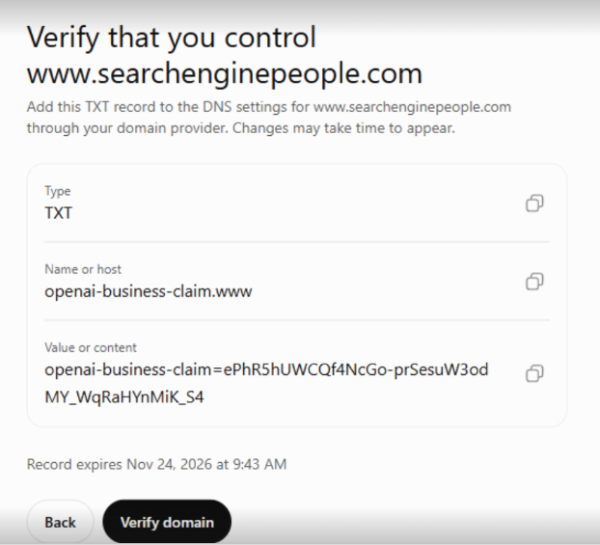
Step 2: Verify Your Business Domain
Once you've selected your business, you'll be asked to verify your connection to it.
Depending on the options available for your listing, verification can be completed through:
Business phone: Receive a verification code by text message or automated phone call.
Website domain: Add a DNS TXT record to your website domain. Keep in mind that each business profile requires its own verification. For this option: The process involves copying the TXT record provided by ChatGPT and adding it to your domain's DNS settings. Once the record is published, return to Business Hub and complete the domain verification.
Step 3: Complete Identity Verification
Verifying your business domain is not the final step. You also need to complete identity verification through Persona, OpenAI's identity verification provider.
During this process, you'll be asked to provide personal identification and relevant business documentation. Depending on your circumstances, this may include:
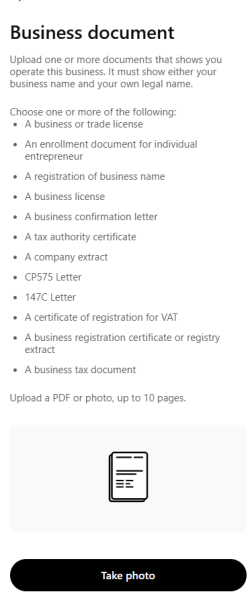
The next step involves confirming your identity and providing the required company information. Official documentation and a self picture.
One convenient feature I noticed was the option to generate a shareable verification link. This means you can complete the identity verification process using another device.
Make sure you have your identification and relevant business information ready before starting.
Step 4: Wait for the Review Process
After submitting the required information, your claim goes through a review process.
OpenAI reviews the submitted information and communicates the outcome by email. You may also receive a request for additional information.
In my experience, the review process was relatively quick.
Once the required verification steps are approved, you can move on to managing your business profile and accessing the available insights.
Step 5: Review Your Business Information
Once your claim and identity verification are approved, you can review and manage the information associated with your business profile.
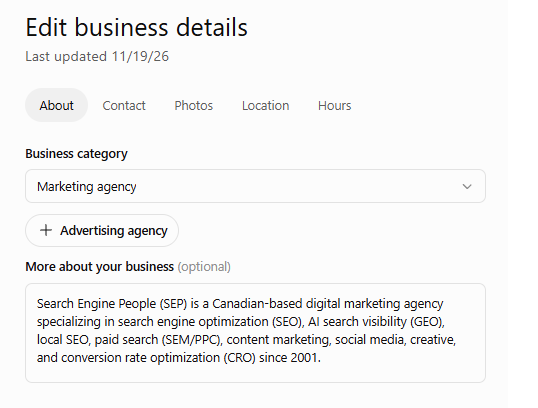
One limitation worth mentioning is that you cannot insert custom tracking codes, Google Analytics scripts or Google Tag Manager tags into your business profile.
Understanding Your ChatGPT Business Insights
One of the most interesting parts of claiming our business profile was gaining access to the reporting dashboard.
Business Hub provides insights into how your business is being discovered and referenced in ChatGPT.
The dashboard includes brand insights and discovery topics, giving businesses a better understanding of their visibility within the platform.
Here are two examples from our reporting dashboard:
1. Brand Insights – How frequently is the business being mentioned?
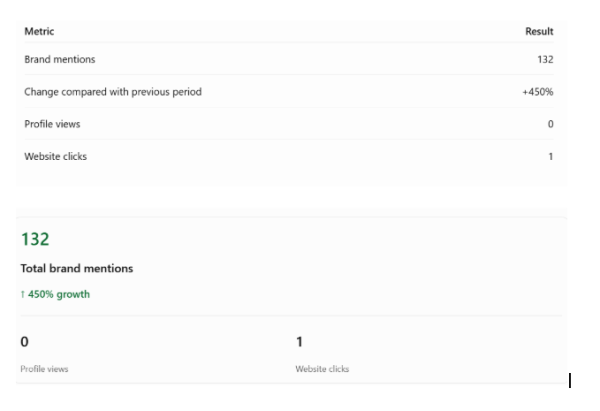
The Brand Insights dashboard provides an overview of business activity over selectable reporting periods, including 7-day and 28-day views.
In our 28-day report, we recorded:
What do these numbers mean?
- Mentions: ChatGPT records the brand mentions during the reporting period. For an online business, a mention is counted when ChatGPT references the business's website. For a local business, it can count when ChatGPT displays the business location as a result.
- % increase: Brand mentions increases compared with the previous reporting period.
- Profile views: The dashboard records the profile views during this period.
- Website clicks: Clicks through to our website are recorded.
The reporting dashboard also includes a graph showing how mentions fluctuate over time.
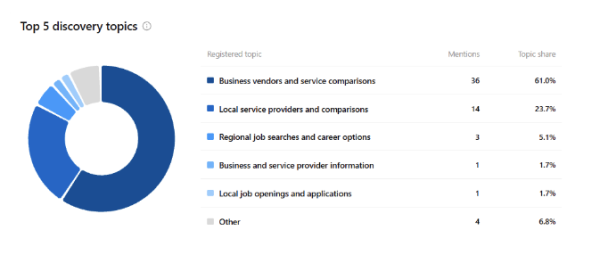
2. Top 5 Discovery Topics: What Topics Are Associated With Your Business?
Another interesting report is the Discovery Topics section.
This chart identifies common themes in ChatGPT answers that mentioned or cited our business.
In our report, 59 mentions were represented in the topic breakdown.
Here's how they were distributed:
Why Should Businesses Claim Their ChatGPT Business Profile?
Search is evolving, and consumers are no longer relying exclusively on traditional search engines to find businesses. People are increasingly using AI-powered platforms to research companies, compare service providers, find recommendations and make purchasing decisions.
Claiming your business profile is an opportunity to take a more active role in managing the information available about your business within ChatGPT.
It also gives you access to insights that can help you understand how your business is being mentioned and the topics associated with its discovery.
Have you claimed your business profile on ChatGPT Business Hub yet?
AI-powered search is creating new opportunities for businesses to get discovered. But claiming your profile is just the beginning.
We can help you strengthen your online presence, improve your visibility across search engines and AI-powered platforms, and make sure your business has the right digital foundations to stand out when potential customers are searching for your products or services.
Let's make sure your business is ready for the future of search!
About the Author: Martha Vasquez