


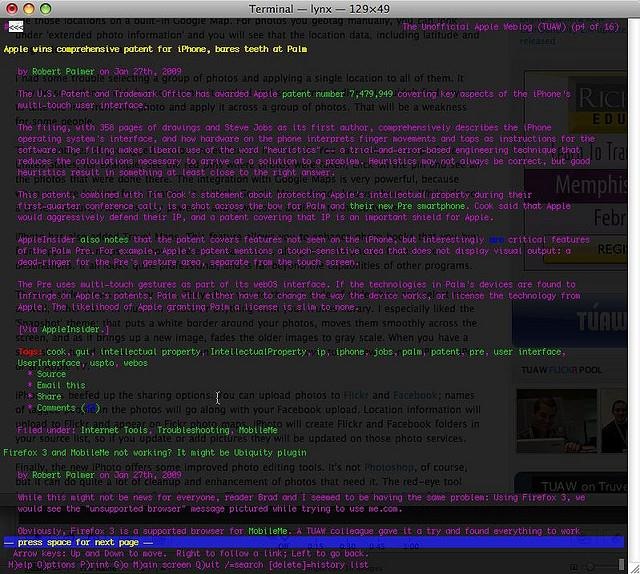
When youre marketing to search engines, knowing how they view your content (and ensuring they can!) is imperative.
Using a tool known as the Lynx browser we can do just that.
What is Lynx Browser?
Before Internet Explorer or Firefox ever existed " back in a time when the internet was largely tech-savvy consumers focused on development " there were text browsers. In the beginning, when the internet was just gaining speed; text browsers were the way you got from page to page.
A Lynx browser is a common text-based browser, still alive and working today on a variety of operating systems. By using a browser like Lynx, youll see the text on pages and the text links, but without images, javascript, flash and other dynamic features or media elements. You could think of it as a bare bone view of your content, in a format that is extremely resource effective.
Why Use Lynx Browser?
If you really love text and hate images, you could use it for your default browser. But thats pretty unlikely considering our natural gravity to media. A Lynx browser is commonly used by search engine optimizers (SEOs) to see content similar to how search engines see it themselves, asserting itself as a very important tool in the SEOs arsenal.
By viewing your content with a Lynx browser, youll be able to see it as the search engines do " and identify potentially destructive issues with crawlability. You can see for yourself if there are any major crawling challenges for spiders by stripping away the flashy features, media and design elements, allowing you to pinpoint and rectify issues before they can become larger problems.
Search Engines and Lynx Browsers
Finally, you might ask yourself " why wouldnt a search engine use a modern browser and go far beyond text? Doesnt our technology today enable this as a possibility?
It makes sense for search engines to use a browser similar to a Lynx for their own crawling purposes " streamlining their task by focusing on the most relevant of elements " text and links. Of course, search engines have expanded their capabilities beyond just text to include flash and certain AJAX elements (known as hijax) " but ultimately their objectives and methods are still the same. Scale, sort and simplify.
Lynx Links
Download the Lynx browser (and source): here.
Basic help and user guide: here.
Quick online Lynx viewer: here.
Related:
- Analyzing your site with free tools (Donna Fontenot)
- 6 Free Search Tools Im Loving Right Now (Ruth Burr)
- 7 New Powerful Web Site Tools You Haven't Heard Of (Kim Krause Berg)
About the Author: Kris Scheben-Edey